Blogger Advance
No Result
View All Result
Thursday, April 23, 2026
  • Login
  • Home
  • Business
    • Marketing
    • Economy
    • Politics
    • Investing
    • Markets
  • How To
    • Blogger
    • WordPress
  • Tools
  • Software
    • Android OS
    • Windows
    • Mac Os
  • Indo
Blogger Advance
  • Home
  • Business
    • Marketing
    • Economy
    • Politics
    • Investing
    • Markets
  • How To
    • Blogger
    • WordPress
  • Tools
  • Software
    • Android OS
    • Windows
    • Mac Os
  • Indo
No Result
View All Result
Blogger Advance
No Result
View All Result
Home How To

How to factory reset in Windows

by Foxy
July 29, 2022
in How To
Reading Time: 3 mins read
132 8
0
ADVERTISEMENT
Share on FacebookShare on Twitter

[ad_1]

If you’d like to know how to factory reset in Windows, then we’ve got you covered right here.

Factory resetting Windows is a useful process as a last resort for troubleshooting an issue, or if you’re looking to sell on an old device and you want it to be factory fresh.

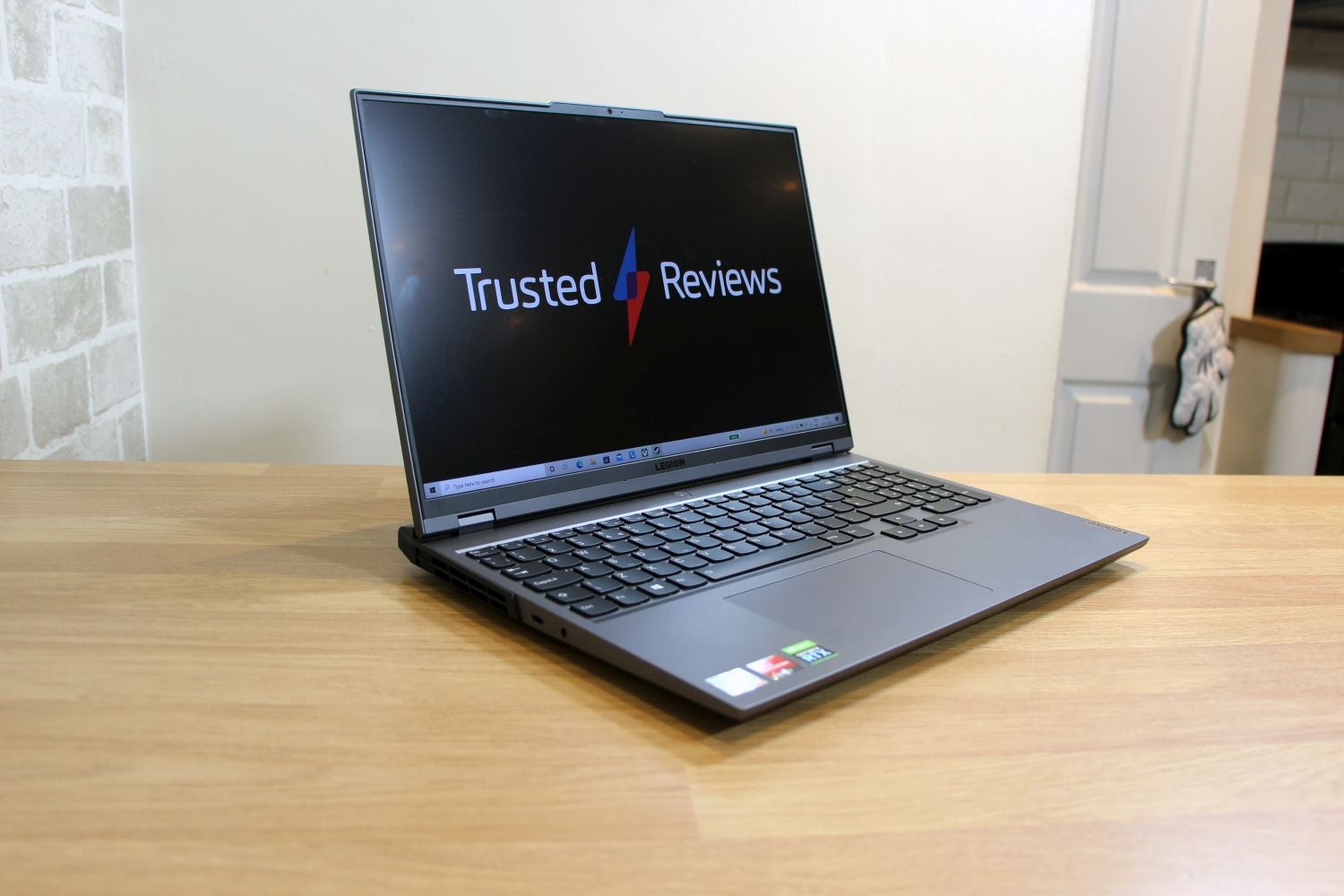
Luckily, the process is simple, and we’re going to take you through every step of the way, whether you’re using a behemoth gaming PC or a cheaper laptop.

So, without further ado, here’s how to factory reset in Windows.

Hardware Used

The Short Version

  • Open the Settings menu
  • Head into ‘Updates and Security’
  • Select ‘Recovery’ from the side bar
  • Press the ‘Get Started’ button
  • Choose either ‘Remove everything’ or ‘Keep my files’
  1. Step
    1

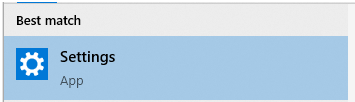
    Firstly, you need to open the Settings menu. To do so, either go into the Start Menu and press on the gear icon, or type ‘Settings’ into the search bar at the bottom.

  2. Step
    2

    Head into ‘Updates and Security’

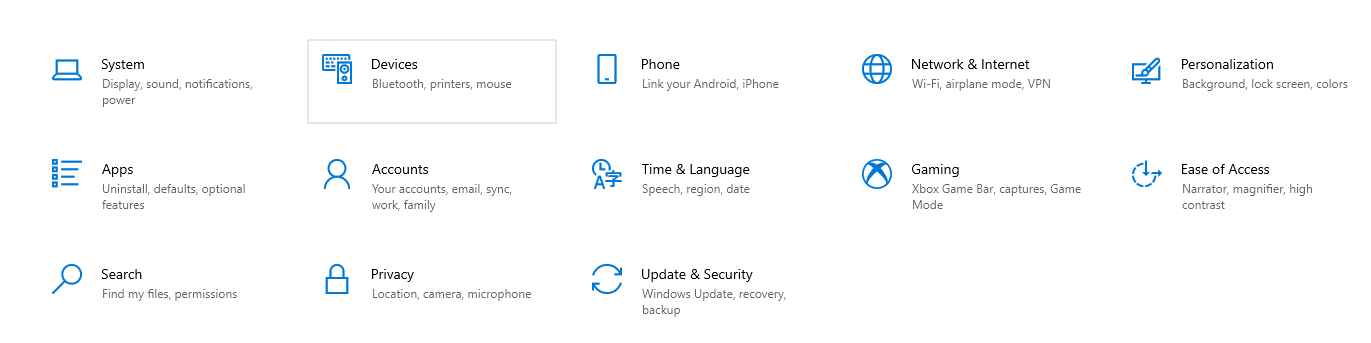
    Once inside the main settings menu, you’ll be greeted with a panel of different options. As we’re factory resetting Windows, we’ll need to go into ‘Updates and Security’.

  3. Step
    3

    Select ‘Recovery’ from the side bar

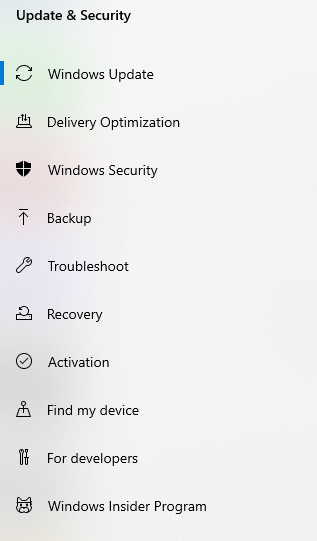
    When you get into the ‘Updates and Security’ menu, navigate to the left-hand side where you’ll see a sidebar. From there, press on the option labelled ‘Recovery’ – it’s around half way down the list.

  4. Step
    4

    Press the ‘Get Started’ button

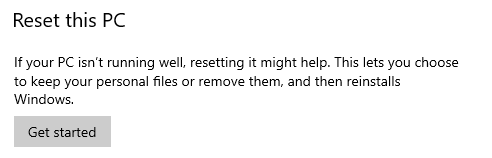
    At the top of the ‘Recovery’ menu, there’s an option labelled ‘Reset this PC’. Underneath the blurb, you’ll see a button labelled ‘Get Started’ – clicking that will open the resetting menu.

  5. Step
    5

    Choose either ‘Remove everything’ or ‘Keep my files’

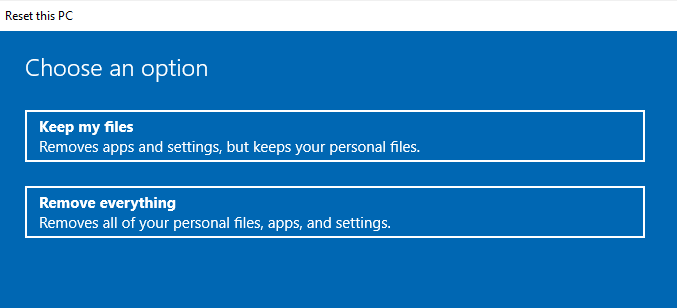
    You can now either choose to ‘Remove everything’ or to ‘Keep my files’. The first option will wipe your entire device, while the second option will remove everything but your own personal files.

    Selecting ‘Keep my files’ will begin the reset process, while pressing ‘Remove everything’ will prompt another screen where you can either choose to remove files from your device or completely wipe the drive. If you’re looking to reset the device entirely, we suggest picking the second option.

FAQs

Will a factory reset fix my laptop?

Sometimes it can be useful for fixing issues with the operating system, but it won’t address every single issue, especially if there’s a hardware fault.

Does resetting PC make it faster?

Yes, a PC will run faster when less data is stored on the hard drive. But as you download more applications and games etc, you’re PC will gradually get slower.

[ad_2]

Source link

Advertisement. Scroll to continue reading.
ADVERTISEMENT
Share64Tweet40Send
Previous Post

How to make a post shareable on Facebook

Next Post

Best Fourth of July Decorations for Your Business in 2022

Foxy

Discover the tactics, strategies, and tools you need to accelerate the growth of your blog. Click to visit

RelatedPosts

How To

How To Create a Group in Discord on a Computer of Mobile Device

August 29, 2022
2k
How To

How To Stream a Nintendo Switch to Twitch

August 28, 2022
2k
How To

How To Get Absolute Value in Google Sheets

August 27, 2022
2k
How To

How to censor explicit content on Spotify

August 27, 2022
2k
How To

How to Cite a Picture in PowerPoint

August 27, 2022
2k
How To

How to change your PS4 name

August 27, 2022
2k
Next Post

Best Fourth of July Decorations for Your Business in 2022

Leave a Reply Cancel reply

Your email address will not be published. Required fields are marked *

  • Trending
  • Comments
  • Latest

How To Fix Sudo: apt-get: Command Not Found

August 9, 2022

Healer’s MIUI 12.5 for MI 8 Lite – PLATINA Mi 8 Lite

June 17, 2022

How to watch the Star Wars films and TV shows in the right order

August 9, 2022

Why Are Gas Prices Going Down?

August 9, 2022

5 Skills You Should Leave Leadership Training With

2

How to Change Your Username on Fortnite

2

20 Effective Ways to Automate and Grow Your Business

2

What is an SBA 7 (a) Loan?

2

Led by base effect & services pickup, Q1 GDP growth seen in double digits

November 5, 2022

Flexible workspaces, hours: PM for more women in labourforce

August 29, 2022

10 Online Business for Sale in August

August 29, 2022

How To Create a Group in Discord on a Computer of Mobile Device

August 29, 2022

Blogroll

AFC SOP JOGJA
JASA WEBSITE BALI
PELUANG BISNIS ONE MORE
PENGACARA DI BALI
AFC SOP SOLO
Lawyers In Bali
Rekomendasi Tempat Oleh - Oleh Khas Bali
ONE MORE INTERNATIONAL

– Advertisment –

ADVERTISEMENT

© 2021 RuangService.Com - Desain by Webhostbali.Com.

Navigate Site

  • Home
  • Advertisement
  • Contact Us
  • Privacy & Policy

Follow Us

No Result
View All Result
  • Home
  • Business
    • Marketing
    • Economy
    • Politics
    • Investing
    • Markets
  • How To
    • Blogger
    • WordPress
  • Tools
  • Software
    • Android OS
    • Windows
    • Mac Os
  • Indo

© 2021 RuangService.Com - Desain by Webhostbali.Com.

Welcome Back!

Login to your account below

Forgotten Password?

Retrieve your password

Please enter your username or email address to reset your password.

Log In
Exit mobile version